Zoomera: Super Camera HD adds dual-perspective capture and precise zoom
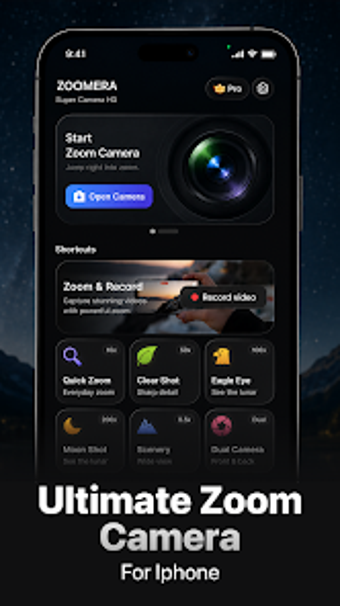
Experience Zoomera: Super Camera HD from Revoto, a photography utility designed to extend mobile camera zoom and multi-angle capture. It provides controlled digital zoom with gradual magnification capabilities, a Dual Camera mode for simultaneous front/rear or dual-zoom angles, and HD photo and video recording. Live filters (vintage, natural, warm tones), on-screen controls, and real-time previews give creators immediate visual feedback for both photos and video. Aimed at Android vloggers and photographers who need finer zoom control and creative dual-view storytelling.
How does Zoomera process camera input to improve magnification?
Zoomera uses algorithmic, digital zoom routines that apply gradual magnification steps to frames rather than altering physical optics. In addition, the developer focuses on AI-driven utilities, so processing targets image-level refinement during capture to smooth transitions and reduce abrupt artifacts. For users, that means the app enhances what the sensor provides through software processing; final sharpness remains tied to each phone's sensor and lens characteristics.
Does it affect system performance during recording?
The developer describes the app as a lightweight utility optimized for modern Android versions to support dual-camera processing and HD media capture. Consequently, contemporary devices should handle recording and live effects without heavy interruption to typical workflows. Nevertheless, running two camera streams or applying multiple real-time filters increases CPU and battery use on older or low-spec devices, so expect slower frame processing and higher power draw on legacy hardware.
Is it safe to use and how are captures stored?
All media captured with Zoomera is saved directly to the device gallery, leaving files inside the phone's normal storage and sharing controls. The tool applies filters and zoom processing at capture time, so captured files reflect the processed output rather than requiring external conversion steps. Because magnification is algorithmic, image results remain dependent on the physical camera, which is an important safety consideration for critical shoots that require native sensor fidelity.
Do I need technical knowledge to operate Zoomera?
User feedback notes a simple interface and a lack of complex setup requirements, which helps nontechnical creators begin capturing quickly. In addition, the app exposes deeper options behind a Premium tier that unlocks full-resolution output and additional multi-view arrangements, so advanced compositions need some menu exploration. Casual users can rely on default modes, while creators seeking specific layouts should budget time to learn the extra controls.
Practical for creators on modern phones, with one clear limitation
Zoomera suits Android creators who want practical, software-driven control over captured footage and prefer quick setup. Its design expects contemporary device capability and a willingness to accept device-dependent image limits. The single clear trade-off is that higher-fidelity outputs and extra multi-view arrangements depend on device capability and an unlocked tier, so users on older hardware or who require every advanced layout by default may encounter constraints.